SAP RFC Troubleshooting
SAP RFC Troubleshooting
This page explains what happens under the hood when Crestone connects to SAP, so you can quickly diagnose things when something fails. For the configuration steps themselves, see Step 4 (SAP role) and Step 5 (RFC connection) of the installation guide.
Ports 32NN and 33NN depend on the system's instance number (sysnr); check the client's sysnr before requesting the enablement. It's a fixed value for that SAP instance (set by Basis when it was installed) — it's not something you choose or change to "make a connection work"; entering a different value than the real one points to the wrong ports.
Architecture
How Crestone connects to SAP
Crestone opens two different channels against different ports. Both are outbound connections from Crestone — nothing enters Crestone's network — but they work in very different ways, and that difference is what usually gets overlooked.
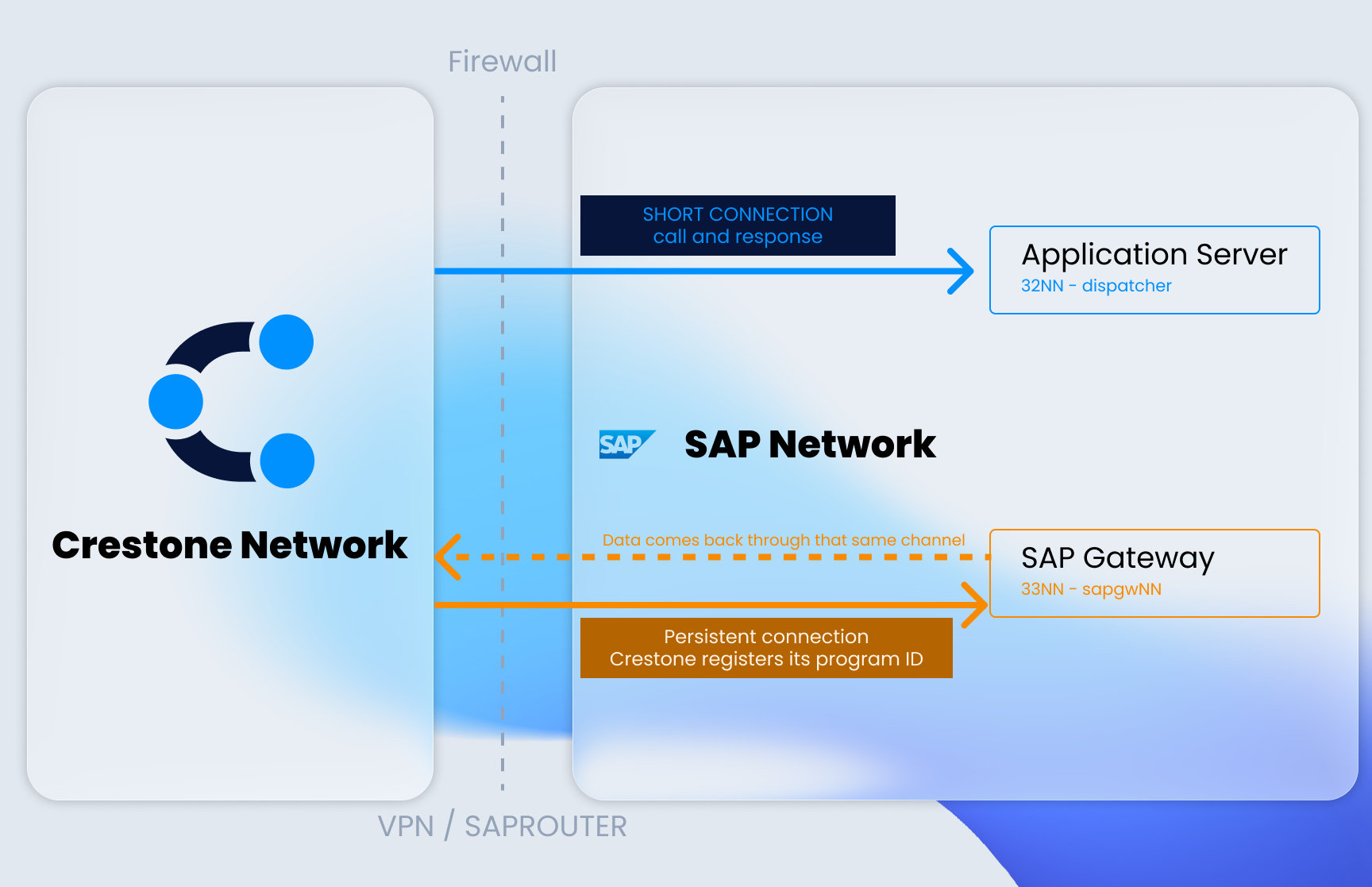
NN is the SAP instance number (sysnr). With sysnr = 00, the ports are 3200 and 3300.
The most common cause of failure
The second channel exists because SAP doesn't return the data as a response to the call. Crestone connects to the gateway on port 33NN, identifies itself with a Program ID, and leaves that connection open. SAP delivers the data packets through that same channel.
If the firewall enables 32NN but not 33NN, the Connection Test and metadata reading work
perfectly — and everything looks correct. The preview and the extraction, however, fail with
TP_NOTREGISTERED or RFC Server or template not ready, because both need to register a
Program ID against the gateway (33NN), not just call the dispatcher.
Mechanism
What exactly happens during an extraction
Understanding this sequence makes connectivity errors stop being ambiguous:
- Crestone connects to the gateway (33NN) and registers with a Program ID, for example
CRES_SLOT_1(see "Program IDs to authorize" below). That connection stays open. - Through the dispatcher (32NN) it invokes the extraction function, telling SAP which Program ID should receive the results.
- SAP reads the data and delivers it in packets, using the connection from step 1 — the one Crestone left open.
If step 1 fails, step 3 has no way to happen. But since step 2 does work, the system looks correctly configured until an extraction is attempted.
How to tell a network problem from a permissions problem
With SMGW → Goto → Registered Server Programs open in SAP, while triggering an extraction from
Crestone:
| What you see in SMGW | What it means |
|---|---|
| The Program ID appears, even briefly, or the log shows an explicit rejection from the gateway | The connection arrived. The problem is the ACLs: that Program ID isn't authorized in reginfo |
| Nothing appears, and there's no trace of the attempt in any SAP log | The connection didn't arrive. The problem is network-related: port 33NN closed, or the saprouttab doesn't cover it |
SAP
Program IDs to authorize
Crestone doesn't register a single Program ID. Preview uses a persistent server, and extraction takes one from a pool of slots that allows processing several extractions in parallel.
Authorizing only the first one produces the most confusing symptom of all: preview returns data and extraction fails.
| Program ID | Used by | Required |
|---|---|---|
CRESTONE_SERVER | Preview and metadata reading | Yes |
CRES_SLOT_1 … CRES_SLOT_N | Data extraction — one slot per concurrent extraction. The count N is configurable in Crestone (Settings → Parallel Extraction) and has to match how many you actually registered in SAP; there's no fixed maximum | Yes, if you'll use parallelism |
After editing
The ACLs need to be reloaded from SMGW → Goto → Expert Functions. Without that step, the
gateway keeps running the previous version loaded in memory and the changes have no effect, even
though the file looks correct in the editor.
Before reloading, confirm the file actually exists on disk. The SMGW editing screen can show the
loaded rules and accept the save even though the file was never created — a message like
file <path>\reginfo.DAT not found, use internal default on that same screen is the tell. To
confirm the real path, check the current value of gw/reg_info and gw/sec_info in RZ11, and
validate (at the OS level, not just via SAP GUI) that those files are actually there. If they
don't exist, they need to be created from SMGW — editing an ACL that has no file behind it isn't
enough.
On systems with more than one application server, it's worth pointing gw/reg_info and
gw/sec_info (in the default profile, not a specific instance's) to the SID's global directory —
typically $(DIR_GLOBAL)$(DIR_SEP)reginfo$(FT_DAT) and its secinfo equivalent — instead of
letting them resolve to each instance's local directory (.../<instance>/data/, the default when
the parameter isn't set). With a per-instance file, each application server needs its own copy,
and it's easy to edit only one and consider the matter resolved without the rest of the system
having changed. With the global path, a single file governs registration across all instances of
the SID.
Gateway Host field: exact meaning
Besides the ACLs, the T-type RFC destination in SM59 has a Gateway Host field pointing to the
host and service of that same system's gateway.
The tooltip for this field in the Crestone connection says: "Here you must specify the IP address or hostname of the SAP server acting as the Gateway host. This information is critical, as it defines which SAP system the RFC service will connect to."
It's easy to misread this and think it refers to the host where Crestone runs (or, when testing
with the demo environment, the demo's host). It's the opposite: it has to be the client's SAP
host — normally the same application server already loaded as ashost. Loading a different
host there doesn't break the Program ID registration (the microservice still connects and
registers, because that other host also responds) — it only breaks when SAP tries to return the
first data packet: preview and extraction fail with GW_CONNECT_FAILED / CM_DEALLOCATED_ABEND,
with the registration looking successful in SMGW up to that point. It's indistinguishable from a
real network problem until this field is specifically checked against the client's actual
connection data.
Diagnostics
From symptom to cause
| Symptom | Likely cause | Where to look |
|---|---|---|
| Connection test fails | Port 32NN closed, host or instance loaded incorrectly, or invalid credentials | Firewall · connection data |
| Preview returns data but extraction fails | The CRES_SLOT_* aren't authorized. CRESTONE_SERVER is, which is why preview works | reginfo · secinfo |
TP_NOTREGISTERED or registration of tp … not allowed | The gateway rejects the registration: that Program ID isn't authorized, or the source host doesn't match | crestone-abap-ms log |
Preview and extraction fail with GW_CONNECT_FAILED / CM_DEALLOCATED_ABEND, even though the Program ID registration looks successful (ALIVE) in Crestone and in SMGW | The connection's Gateway Host field points to a host that isn't the client's SAP (for example, a Crestone demo environment's host was left loaded) | Connection data · check Gateway Host against the client's real ashost |
RFC Server or template not ready after 15s, with no trace of the attempt in SAP | The registration never reaches the gateway. Port 33NN closed, or the saprouttab doesn't cover it | SMGW → Registered Server Programs |
| It was working and stopped working with no changes | The gateway dropped the registration due to inactivity, or an intermediate firewall resets long-lived connections | SM21 · crestone-abap-ms log |
service 'sapgwNN' unknown / NiSrvLGetServNo | Old SAProuter (releases ≤722 seen in the field) without the SAP service names (sapgwNN) in its /etc/services: it rejects the registration even though port 33NN is open. Crestone already resolves the gateway by numeric port (33 + sysnr) instead of the symbolic name to avoid this — confirm the microservice is on a version that includes that fix | SAProuter trace (dev_rout) |