ODATA SAP Business One
ODATA SAP Business One
How to create an SAP source with the OData protocol
This page walks you through setting up a connection with OData services. You’ll learn how to authenticate, define endpoints, and integrate structured SAP data into Crestone via standard OData protocols.
1. Select the source type:
- Select any of the OData options we have available to connect your source
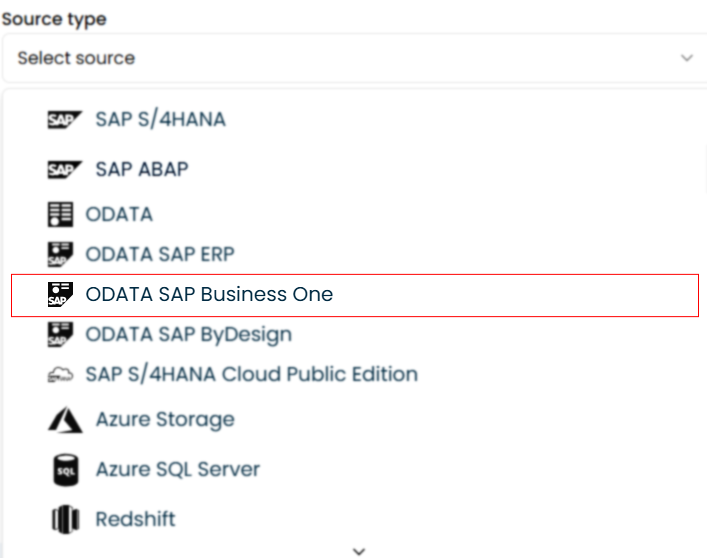
2. Select the type of authentication
- Basic Auth
- API Key
Enter SAP OData credentials:
You will be prompted to enter the credentials needed to connect to your SAP OData system.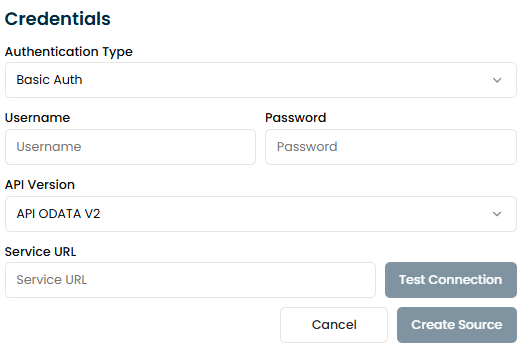
Username
- Use your SAP account credentials to authenticate. The Username is provided by your SAP administrator.
- If you’re unsure of your Username, verify it with your system administrator or in the SAP GUI under User Settings.
Password
- Enter the Password associated with your SAP account.
- If you don’t know your Password or need to reset it, contact your SAP administrator.
Service URL
- Obtain the OData Service endpoint URL from your SAP system administrator.
- This URL typically points to the specific OData service you want to connect to, and it may look like:
https://<sap-server>/sap/opu/OData/<service-name> - Ensure the URL includes the correct protocol (https:// or http://), server address, and service name.
Enter API Key:
You will be prompted to enter the credentials needed to connect to your SAP OData system.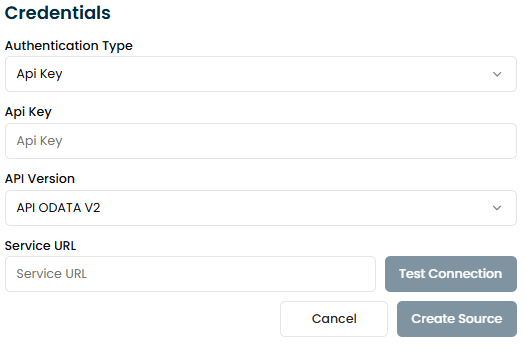
API Key
- Enter the API Key associated with your SAP account.
Service URL
- Obtain the OData service endpoint URL from your SAP system administrator.
- This URL typically points to the specific OData service you want to connect to, and it may look like:
https://<sap-server>/sap/opu/OData/<service-name> - Ensure the URL includes the correct protocol (https:// or http://), server address, and service name.
3. Test the connection:
Click the "Test Connection" button to verify that the connection to the SAP OData system is working correctly. If the test is successful, the system will enable additional configuration options.
4. Create the connection:
Finally, click the "Create Source" button to establish the connection to SAP OData.
Connection Parameters
| Parameter | Description | Example |
|---|---|---|
| Authentication | Authentication method (Basic Auth or API Key) | Basic Auth or API Key |
| Username | SAP user (only if using Basic Auth) | sapuser |
| Password | Password of the SAP user (only if using Basic Auth) | — (hidden) |
| API Key | Access key (only if using API Key authentication) | 12345-abcde-67890 |
| Service URL | Endpoint of the OData service | https://sap.company.com/sap/opu/odata/ServiceName |