Trigger (HTTP / cURL)
Trigger (HTTP / cURL)
This feature allows you to run a Job from outside Crestone using an automatically generated URL.
You can use tools such as Postman, cURL, or any HTTP client.
1. Open the Job Trigger
- Go to the Jobs section
- Open the Job you want to execute
- Click the Trigger button (top right)

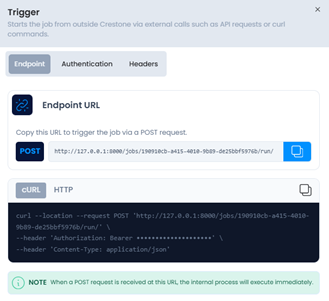
2. Get the Endpoint URL
In the Endpoint tab:
- Copy the generated URL
- The URL includes the Job ID
- Execution is performed via a POST request
Example:
POST http://<host>/jobs/<job-id>/run/
A ready-to-use cURL command is also displayed.
3. Configure Authentication
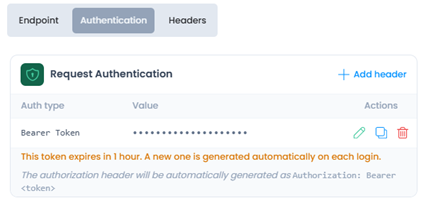
In the Authentication tab:
- Bearer Token authentication is used
- Include the following header:
Authorization: Bearer <token>
The token expires after 1 hour.
4. Configure Headers
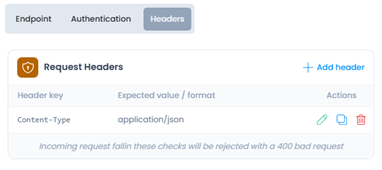
In the Headers tab:
- By default, the following is required:
Authorization: Bearer <token>
- Additional headers can be added if necessary
- Run the Job Example using cURL:
curl --request POST 'http://<host>/jobs/<job-id>/run/' \
     --header 'Authorization: Bearer <token>' \
     --header 'Content-Type: application/json'
6. Server Responses
- 200 OK → execution successful
- 400 Bad Request → incorrect or missing headers
- 401 Unauthorized → invalid or expired token