OData in the node: filters, pagination, timeouts and delta
OData in the node: filters, pagination, timeouts and delta
This guide explains how a node with an OData source works (SAP Gateway, ByDesign, SAP Cloud, SAP Business One): what each field does, how the preview differs from the extraction, how data is paginated, how long Crestone waits for a response, and how delta extraction works with ODP services.
1. Summary
| Concept | Where it is configured | What it does |
|---|---|---|
| Entity URL | Source step of the node | Indicates which entity is read and with which filters |
| Parameters | Source step | Adds $filter, $select, $orderby, $top... to the URL |
| Variables | Source step | Dynamic values (for example dates) used with @name |
| Page Size | Source step | Number of records requested per call |
| Select mode (Full / Delta) | Source step, ODP services only | Full load or changes only |
| Maximum wait time (minutes) | Settings tab | Maximum time to wait for each request to SAP |
2. The connection and the Entity URL
The connection
The Service URL of the connection is the base of the service and must not include the service name. The service is specified later, in the node. Example of a base:
http://<server>:50000/sap/opu/odata/sap/
The node's Entity URL
In the node, enter the service and the entity, and optionally the filter:
ZCRESTONE_MATERIALATTR_SRV/EntityOf0MATERIAL_ATTR
Some connections already include the service in their base URL (for example .../ZCUSTOMER_ODATA_5_SRV/). In that case, the Entity URL contains only the entity (EntityOf0CUSTOMER_TEXT). Repeating the service causes a 404 error.

3. Parameters, filters and $top
The Parameters table adds OData parameters to the URL (key and value, with a checkbox to enable them). The most commonly used are $filter, $select, $orderby, $top, $skip, $expand and $count.
Rules applied by Crestone:
- It always requests the response in JSON (
$format=json). On SAP Business One Service Layer it does not add it, because that service does not accept it. - Spaces in the filter are sent as
%20, which every service accepts (ByDesign does not accept+). - The filter can be written in the Entity URL itself or in the table; the editor keeps both in sync.
Filter example:
ZCREST_2LIS_02_HDR_SRV/EntityOf2LIS_02_HDR?$filter=EKORG eq 'APP' and BEDAT ge '20250501'

What $top means in each place
| Where | What it means |
|---|---|
| In the preview | Maximum number of rows shown: 30. If there is no $top, 30 is used; if there is a larger one, it is lowered to 30 |
| In the Entity URL, when extracting | Total limit of records. The extraction stops when it reaches that number |
Without $top, when extracting | Everything is retrieved, page by page |
A $top in the URL is not the page size, it is the total limit. To control how many records are requested per call, use Page Size (section 6).
4. Dynamic variables
Variables let you use a value that changes on every run (for example a date) inside the filter.
- Create the variable in Create variable, with a name (
datefrom) and a default value. - Use it in the filter with
@:$filter=CreationDate ge '@datefrom'.
Rules:
- The substitution is literal: Crestone does not add quotes. If the service needs them (dates, text), write them in the filter (
'@datefrom'); for numbers, omit them. - The value can be an expression, for example yesterday's date:
{{ (today() - timedelta(days=1)).strftime('%Y-%m-%d') }}. It must be formatted the way the service expects.
5. Preview and extraction: what changes
| Preview | Extraction | |
|---|---|---|
| Records | Maximum 30 | All records that match the filter (or the $top limit) |
| Wait time | Fixed: 300 seconds | The node's setting (section 7); 300 s by default |
| Pagination | No: a single request | Yes (section 6) |
| Delta | Not applicable | Yes, if the node is in Delta |
| SAP Business One with several companies | Shows only the first one | Combines all the selected ones |
A working preview does not guarantee that the extraction will work. On slow services, a 30-row preview may respond fine while the full extraction needs much more time, or the other way around. The preview also does not use Delta mode.

6. Pagination and Page Size
When extracting, Crestone requests the data page by page. Depending on the type of service, it uses one of three modes:
| Service | How it paginates | Page Size |
|---|---|---|
| Standard OData (Gateway, ByDesign, Cloud) | Requests $top records with an increasing $skip, until a page comes back incomplete | It is the $top of each request. Default: 50,000 |
ODP services (EntityOf... / FactsOf...) | Server-side pagination: sends the Prefer: odata.maxpagesize header and follows the __next link returned by SAP | It is the size requested from SAP |
| SAP Business One (session login) | Prefer: odata.maxpagesize header, and follows odata.nextLink | Empty = the Service Layer's default (normally 20) |
Why pagination on an ODP service is different
On an ODP service, every request with $skip makes SAP run the whole extractor again, which can take minutes per page and return repeated data. With server-side pagination, SAP extracts only once and the following pages come from a queue within seconds. That is why on an ODP service you do not need to (and should not) use $top.
To extract everything from an ODP service, do not put $top in the URL. If you do, Crestone goes back to classic pagination with $top and $skip, and Delta mode stops applying.
Page Size
This is the Page Size (optional) field. Lower it if the service runs out of time with large pages. If empty, the default value is used (50,000, or the B1 default).
7. Wait time and retries
Wait time
This is the maximum time Crestone waits for the response to each request to SAP; it is not the total duration of the execution.
| Where | Value |
|---|---|
| Default | 300 seconds (5 minutes) |
| Maximum wait time (minutes) field in the node's Settings | Whatever you set, up to a maximum of 720 minutes (12 hours) |
Recommendations:
- If the service is slow (an ODP service without a filter can take many minutes to return the first page), increase the node's value.
- The preview does not use this value: it always waits 300 s.
- A
ReadTimeoutmeans SAP did not respond in time. It is not a Crestone error; you need to filter more, lower the Page Size or extend the wait time.
Retries
If the connection drops in the middle of a page (for example because of a VPN or the server), Crestone retries that page up to 3 times, waiting 5 and 15 seconds between attempts. A ReadTimeout is not retried: the full configured time was already waited.
Cancellation
When you cancel an execution from Monitoring, the OData extraction stops before requesting the next page.
8. ODP services: things to know
An ODP service exposes a SAP extractor (for example 2LIS_02_HDR, 0MATERIAL_ATTR) as OData. They are recognized by the entity name: EntityOf... or FactsOf....
- Filters: filterable fields usually accept a single interval (
eq, orgeandle). They do not acceptor: for several values, create one node per value. - A filter that SAP does not apply (for example a field that is not a selection field in the extractor) does not raise an error, but returns data outside the filter. Fix it by marking the field as a selection field in SAP.
- Without a filter, the first page can take a long time, because SAP goes through the whole extractor before responding.
$counttotals may not be reliable on these services; do not use them to size the load.- Cancellation rows: in transactional extractors (2LIS), records with
ROCANCEL = Xarrive, which cancel a previous image (see section 10).
9. Delta extraction
What it is
In Delta mode, the first run loads all the data and the following runs bring only the changes since the last time. It is available only for SAP Gateway ODP services.
How to enable it
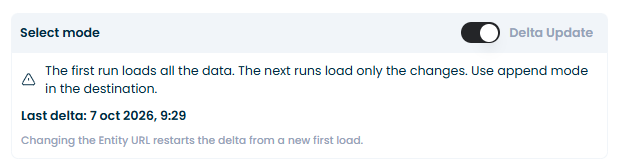
In the Source step, below Create variable, the Select mode option appears (only for EntityOf... / FactsOf... entities). Turning the switch on changes it to Delta Update.

How it works
| Run | What it does |
|---|---|
| First (initialization) | Asks SAP for change tracking (Prefer: odata.track-changes), loads everything and saves the starting point |
| Following | Start from the saved point and bring only the changes |
| No changes | Ends as No data; the starting point still advances |
| With an error loading to the destination | The starting point does not advance: the next run repeats the same delta and no changes are lost |
What is stored in the node
When a delta run finishes successfully, a deltaState block with three attributes is added to the node's source:
| Attribute | What it is |
|---|---|
link | Link with the token from which SAP delivers the changes on the next run |
urlKey | Fingerprint of the Entity URL. If the URL changes, the delta starts over |
updatedAt | Date of the last saved delta run |
The screen shows that date as Last delta, in your local time. It is the date of the last run that finished successfully, not the date of the last change received.
What happens when the configuration changes
| If... | Then... |
|---|---|
| You change the Entity URL (for example, you add a filter) | deltaState is discarded; the next run is a new initial load |
| You switch to Full | deltaState is discarded; the rest of the configuration stays the same |
| You switch back to Delta | The first run is an initialization |
The URL has $top | Delta does not apply: Crestone warns and runs in Full |
| The entity is not ODP | The selector does not appear |
Filters are fixed at initialization. If the filter uses a variable whose value changes on every run, that change is not sent to SAP: the delta keeps using the filter from the first run. This is inferred from how delta works and has not been verified. For delta, it is best to use fixed filters.
If a run fails
- It fails before or during the load to the destination: the starting point does not advance and the next run brings what is pending plus the new changes. No manual step is needed.
- SAP keeps the delta data in a queue (ODQ) for a limited time. If a long time passes without running, SAP may discard that point and you would need to reinitialize (switch to Full and back to Delta). The retention period of each system is not confirmed: it is best to schedule frequent runs.
10. What arrives when a record changes: the row pair
How changes look depends on the extractor.
Transactional extractors (for example 2LIS): two rows per change
When a record is modified, SAP does not send only the new value: it sends two rows.
| Row | ROCANCEL | What it contains |
|---|---|---|
| Before image | X | The record as it was before, marked as a cancellation (amounts and quantities come inverted) |
| After image | empty | The record as it is now |
Illustrative example: the purchasing group of an order is changed from 002 to 003.
EBELN | ROCANCEL | EKGRP |
|---|---|---|
| 4500000589 | X | 002 |
| 4500000589 | (empty) | 003 |
When a record is created, a single row arrives (the new one). A run without changes brings no rows.
How to use it in the destination:
- Load in append mode and sum the measures: the cancelled row subtracts the previous value and the new one adds the current value, so totals come out right.
- To see only the current state of each record, filter on an empty
ROCANCEL. - Do not merge by key: the cancelled row and the new one would overwrite each other.
Changes to order items (price, delivery date) do not arrive in the header extractor: they belong to the items extractor (2LIS_02_ITM) or the schedule lines extractor (2LIS_02_SCL). Each extractor's delta only brings changes to its own fields.
Master data (for example materials): one row per change
Extractors such as 0MATERIAL_ATTR have no ROCANCEL: they deliver one row per change, and the ODQ_CHANGEMODE column indicates the type (C is a creation). Since there is a unique key per record (MATNR), it is best to load with upsert by key.
- The first delta run may bring old records that SAP had pending, in addition to the new ones. This is SAP behavior.
- With this type of extractor, SAP depends on change pointers: if they are not active, the delta always comes back empty.
11. Common errors
| Message | Likely cause | What to do |
|---|---|---|
Credentials invalid (401) | Wrong user or password, or SAP session locked | Check the connection |
No service found (403) | The service is not active or the user lacks permission | Check the service in SAP |
Container not found (404) | The entity or the service does not exist, or the service name is repeated | Check the Entity URL (section 2) |
The url has not a valid system query option (400) | A parameter the service does not accept (nonexistent field, or on an interval field) | Try without the filter and add it back one at a time |
Unexpected error with SAP text in the detail | Internal error in the service. The detail shows the message SAP returned | Look up the ID in SAP transaction /IWFND/ERROR_LOG |
Read timed out | SAP did not respond within the time limit | Increase Maximum wait time, filter more or lower the Page Size |
Delta mode ignored (in the console) | The entity is not ODP or the URL has $top | Remove $top or use an EntityOf... entity |
Entity URL changed since the last delta (in the console) | The URL was changed | This is expected: the delta restarts |