Parallel Extraction
Parallel Extraction
What is it?
By default, Crestone runs extractions sequentially, using a single RFC connection
(CRESTONE_SERVER) against SAP: one extraction at a time. Parallel Extraction lets you run
several extractions at the same time, using additional RFC connections (the "slots"
CRES_SLOT_1...CRES_SLOT_N) instead of just one.
This setting is optional and applies at the tenant level (your company), not per workspace: if your company has several workspaces, they all share the same Parallel Extraction configuration.
Important: don't enable Parallel Extraction — or set a count higher than what you actually have — if you haven't created the corresponding
CRES_SLOT_1..Ndestinations in your SAP yet (see the RFC connection step in the installation guide). If the number configured here is higher than the number of slots you actually registered in SAP, every extraction will waste time trying slots that don't exist before falling back toCRESTONE_SERVER(or it may fail outright, depending on how your gateway is locked down) — causing delays or conflicts instead of improving performance.
Configure Parallel Extraction
1. Go to Settings
Go to Settings → Parallel Extraction.

2. Enable and edit
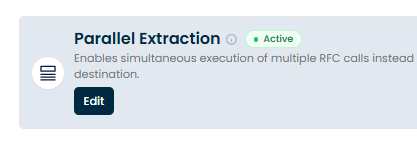
Turn on the switch and click Edit to see the configuration field.
3. Number of parallel RFCs
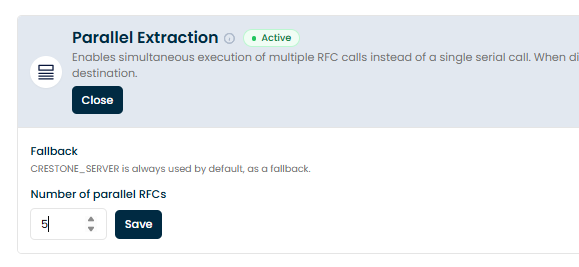
In "Number of parallel RFCs", enter how many CRES_SLOT_N destinations you actually created
and registered in your SAP (a whole number, 1 or more). CRESTONE_SERVER is always used as a
fallback — you don't need to count it in this number.
4. Save
Click Save to store the configured number.